
Move Validated, Structured CRM Data Into Your Next System
Classify, correct, and normalize contact and account records before migration to prevent legacy CRM problems from becoming part of the new environment.
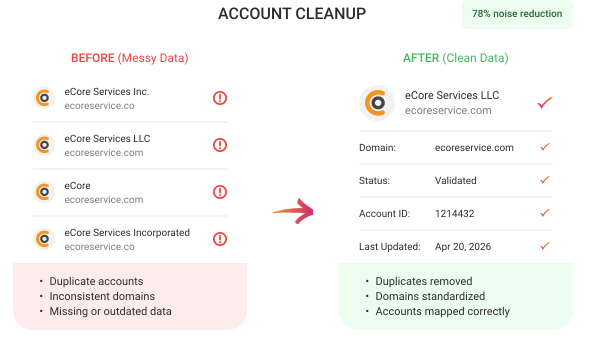
CRM Migrations Expose Data Problems the Old System Learned to Live With
A CRM migration, consolidation, or platform change forces teams to look closely at records that may have accumulated over years of imports, enrichment projects, ownership changes, and inconsistent data practices.
Problems that were tolerated in the existing CRM become migration decisions.
Duplicate Records Represent the Same Contact
Multiple versions of a person may exist across teams, regions, imports, or historical workflows without a clear surviving record.
Employment Relationships Are Outdated
Contacts remain attached to companies they have left, creating uncertainty about which employment and account data should move forward.
Person-to-Account Mapping Is Wrong
Contacts may be associated with incorrect accounts because of domain mismatches, parent-subsidiary structures, acquisitions, or historical mapping errors.
Titles and Role Data Follow Different Standards
Job titles, functions, levels, and persona classifications may have been entered or enriched under inconsistent taxonomies.
Required Fields Are Missing or Unreliable
The destination CRM may require attributes that are incomplete, outdated, or inconsistently populated in the source data.
Historical Records Have No Clear Migration Action
Teams know the database contains stale or low-value records but lack a consistent framework for deciding what should move, change, merge, or stay behind.
Migrating Unresolved CRM Data Moves the Problem Instead of Fixing It
A successful technical migration can still produce an unreliable CRM if the records entering the new system carry the same unresolved quality problems.
Duplicate Records Enter the New Environment
Historical duplicates can become part of the destination CRM before new ownership, automation, and reporting workflows are established.
Incorrect Account Relationships Affect Assignment
Bad person-to-account mappings can distort account ownership, routing, territory logic, and relationship visibility after migration.
New Taxonomies Inherit Old Inconsistencies
Unnormalized titles, functions, levels, and company classifications make it harder to apply a consistent data model in the destination system.
Teams Spend the Post-Migration Period Fixing Records
CRM administrators and operations teams may need to investigate data quality after launch while users are already trying to adopt the new environment.
Reporting Starts With Unreliable Inputs
Leadership and analytics teams can inherit inconsistent field values, duplicate entities, and outdated relationships in the reports built on the migrated data.
Automation Activates Legacy Data Problems
Routing, scoring, segmentation, AI, and other downstream workflows can immediately begin processing records that were never validated for the new operating model.
Turn CRM Migration Into a Data Decision Workflow
Instead of treating migration as a bulk transfer of existing records, eCore helps evaluate the data before it enters the destination environment.
Define the Migration Population and Destination Requirements
Identify the contact and account records in scope, the fields required by the destination CRM, and the business rules that will govern the migrated dataset.
Validate and Classify Existing Records
eCore evaluates contact identity, current employment, account relationships, duplicate conditions, and other defined quality requirements.
Resolve and Normalize Migration Data
Records are corrected, enriched, deduplicated, or standardized according to the target field structure and internal taxonomy.
Prepare the Dataset for Migration
The resulting data is structured and delivered around the destination requirements so teams can move forward with a more controlled migration population.
Prepare the Data Before the Destination System Inherits It

Use the migration event to define what data should move forward and what the new environment needs from it.

Resolve the Record-Level Issues That Complicate CRM Migration
The migration dataset should reflect the contacts, accounts, and field logic the destination environment is expected to use.
Classify Records Before They Move
Migration data does not always need a binary migrate/do not migrate decision.
Depending on the agreed workflow, records can be classified to keep, update, merge, suppress, replace, or remove. The resulting action logic gives CRM and data teams a clearer framework for preparing the migration population.
A New CRM Does Not Make Legacy Data More Trustworthy
Changing systems can improve architecture, workflows, and user experience.
It does not verify whether the contacts and accounts moving into the new CRM are current, correctly mapped, or structured for the new data model.
Confirm Identity Before Merging Records
Similar names, incomplete profiles, and historical imports can create records that appear duplicative without representing the same person.
Verify Employment Before Preserving Account Relationships
A contact should not automatically retain a company relationship simply because that relationship exists in the source CRM.
Resolve Company Relationships Before Account Mapping
Parent companies, subsidiaries, brands, rebrands, and acquisitions can complicate how legacy accounts map into the destination environment.
Normalize Data Against the New Operating Model
Historical title and classification logic may not align with the function, level, industry, or taxonomy structure the new CRM will use.
Apply Migration-Specific Business Rules
Record age, account relevance, field requirements, region, or other client-defined criteria may influence what action a record receives.
Review Exceptions Instead of Forcing Migration Decisions
Ambiguous records can require evidence-based human review when automated validation does not provide enough confidence.
Start the New CRM With More Usable Data
Reduce Legacy Data Carried Forward
Identify stale, duplicate, or unresolved records before they become part of the destination environment.
Improve Contact-to-Account Accuracy
Move contacts forward with stronger validation of current employment and account relationships.
Standardize Critical CRM Fields
Align titles, functions, levels, company classifications, and other defined attributes with the target data model.
Reduce Post-Migration Cleanup
Resolve more record-level data questions before CRM administrators and operations teams begin working in the new environment.
Improve Downstream Workflow Readiness
Give routing, segmentation, reporting, scoring, and AI workflows a more controlled source dataset after migration.
Give Data Owners Clearer Migration Decisions
Use record classification and defined business rules to distinguish which records should be kept, updated, merged, suppressed, replaced, or removed.
See How a Legacy CRM Record Becomes Migration-Ready
Migration preparation becomes tangible when each record is evaluated against a defined destination requirement and assigned a clear action.
- 01
A Legacy Record Enters the Migration Population
A contact exists in the source CRM with an old title, incomplete company data, and a second similar record created through a later import.
Both records are currently associated with the same account.
- 02
Identity and Employment Are Validated
eCore determines whether the two records represent the same person and checks whether the contact still works for the company stored in the CRM.
The available company relationship is reviewed before account data is carried forward.
- 03
The Record Is Classified and Resolved
Duplicate conditions, current employment, title data, function, level, and required account attributes are evaluated against the migration rules.
The record receives the appropriate action and required values are normalized to the destination structure.
- 04
Migration-Ready Data Is Prepared
The resulting record is structured around the agreed target fields and migration action, giving the CRM or data team a clearer dataset to move into the new environment.

Prepare CRM Data Around the Systems and Migration Plan Already in Place
eCore's role is not to replace the CRM implementation or migration partner.
The data preparation workflow sits before the destination environment and helps resolve the contact and account data being transferred.
Source CRM Data
Start with the contact and account populations already identified for migration or consolidation.
Destination Field Requirements
Align validation, enrichment, normalization, and output with the fields and data structure required by the new CRM environment.
Internal Taxonomies
Map titles, functions, levels, company classifications, and other defined values to the organization's target taxonomy.
Existing Data Providers
Use current provider outputs where they add coverage while applying validation when employment, identity, or account relationships remain unclear.
Migration and Implementation Partners
Deliver a more structured dataset to the internal team, consultancy, or implementation partner responsible for the technical CRM migration.
Enterprise Delivery Workflows
Support client-specific field mappings and secure data delivery requirements for higher-volume or more complex migration programs.
Related Data Workflows
Enrich CRM Data Before Activation
Validate and enrich existing CRM records before routing, segmentation, scoring, campaigns, or sales workflows use them.
Explore CRM Data Enrichment →Use caseMaintain GTM Data Over Time
Keep contact and account data current after the new CRM environment goes live.
Explore Ongoing Data Maintenance →Use casePrepare GTM Data for AI Workflows
Validate and normalize CRM and GTM source data before it powers AI-driven workflows.
Explore AI Workflow Data Preparation →
CRM Data Cleansing
Determine which CRM records should be kept, updated, merged, suppressed, replaced, or removed.
Explore CRM Data Cleansing →CRM Migration Data Preparation FAQs
Data preparation should begin early enough for teams to define the migration population, destination field requirements, record-action rules, and exception-handling process before the final transfer. Waiting until the technical migration is underway can compress data-quality decisions into the implementation timeline. The exact schedule depends on dataset size, data condition, and the complexity of the destination model.
A standard CRM cleanup focuses on improving the quality of the current CRM. Migration data preparation applies validation, classification, and normalization to a defined population because those records are moving into a new or consolidated environment. The destination schema, target taxonomy, migration rules, and required fields become part of the data-quality decision.
Not necessarily. eCore's CRM quality methodology can classify records to keep, update, merge, suppress, replace, or remove. The appropriate action depends on the organization's migration rules, data requirements, and intended use of the destination CRM. The goal is to make the migration population more intentional rather than assuming every historical record should move.
Duplicate conditions are evaluated alongside contact identity and other available record data. Similar records should not automatically be merged solely because names or companies appear alike. eCore can validate whether records resolve to the same contact and apply the agreed merge or classification rules before the migration dataset is prepared.
Yes. Current employment verification can be applied to determine whether contacts are still associated with the companies stored in the source CRM. Employment accuracy and employment validation rate are documented quality measures in eCore's CRM data work.
Yes. Data normalization and client-specific business rules are core parts of eCore's operating model. Titles and other role attributes can be mapped to the function, level, or classification structure defined for the destination environment.
These relationships can complicate account mapping when legacy records use historical names, domains, or company structures. eCore can validate person-to-account relationships and company relationships so the migration workflow can apply the appropriate account mapping or exception logic. Bad account mapping is a documented CRM quality problem eCore addresses.
The workflow should define how unresolved records are handled. Depending on the business rules, they may be flagged for human review, assigned an exception status, or withheld from a migration-ready population until a decision is made. eCore's validation model explicitly includes human review for unclear records.
Yes. The workflow can be designed around client-specific mappings, destination requirements, business rules, and delivery methods. This makes eCore relevant as the data-quality layer supporting the internal team, consultancy, or implementation partner responsible for the broader migration program.
Useful measures include actionable-record percentage, duplicate reduction, employment validation rate, required-field accuracy and completion, person-to-account accuracy, and unresolved exception volume. The final criteria should reflect what the destination CRM and its downstream workflows require. eCore already tracks actionable-record percentage, duplicate reduction, employment validation rate, and field accuracy in CRM quality work.
Move Better Data Into Your Next CRM
Validate, classify, and normalize contact and account records before legacy data problems become part of the new environment.